EDGARsuite
™
- The Premier Software Suite for SEC filers
sec-edgar-filing.com
a division of Advanced Computer Innovations, Inc.
70 Office Park Way • Pittsford, NY 14534-1746 (USA)
Phone or text: 585-510-3890 • Email: click here
Introducing EDGARsuite
™
- Unleash Your Filing Potential!
Tired of the tedious and time-consuming process of producing EDGAR filings? Look no further! With EDGARsuite ™ , our revolutionary desktop software, you can streamline your filing process while enjoying unmatched benefits that will revolutionize the way you work: • Cost Savings: Say goodbye to excessive fees and unnecessary expenses. EDGARsuite ™ empowers you to take control of your filing budget. No more outsourcing or hiring additional staff - our software provides cost savings that go straight to your bottom line. • Ease of Use: We understand that your time is precious. That's why we designed EDGARsuite ™ with simplicity in mind. Our intuitive interface allows you to effortlessly navigate through the filing process, even if you're a first-time user. Say farewell to complex systems and hello to seamless filings. • Accuracy: Accuracy is paramount when it comes to EDGAR filings. Trust in the precision of EDGARsuite ™ to ensure that your documents meet regulatory requirements flawlessly. With our software, you can eliminate the risk of errors, saving you from the headache of potential revisions. • Quick Speed: Time is of the essence, and we value your efficiency. EDGARsuite ™ empowers you to meet tight deadlines without compromising quality. Experience lightning-fast filing preparation and submission, saving you valuable hours that can be better utilized for strategic planning and growth. • Security and Confidentiality: We prioritize the safety of your sensitive data. With EDGARsuite ™ , you can rest easy knowing that your information remains secure on your local device. Take control of your filing process while maintaining the highest level of data confidentiality. • Inline XBRL: Stay ahead of the curve with our cutting-edge technology. EDGARsuite ™ supports Inline XBRL, enabling you to seamlessly and easily embed financial information directly into your filings using its user-friendly and responsive XBRL tagging interface. Its built-in AI Agent doesn’t just recommend the right Inline XBRL tags - it also applies them automatically! This means faster, more accurate filings with less manual effort, giving you intelligent automation and peace of mind in one powerful solution. • Collaboration: Teamwork makes the dream work, and EDGARsuite ™ understands the value of collaboration. Our software facilitates seamless collaboration among team members, allowing for simultaneous work on different sections of the filing. Enhance efficiency, foster teamwork, and maximize productivity. Don't let the complexities of EDGAR filings hold you back any longer. Unlock the full potential of your filing process with EDGARsuite ™ . Experience cost savings, ease of use, accuracy, quick speed, security, easy Inline XBRL with AI-based automatic tagging, and collaboration - all in one powerful software package. Get EDGARsuite ™ today and empower your filing strategy like never before! Contact us now to learn more and start your EDGARsuite™ journey. Your filing success awaits!Technical Details
EDGARsuite ™ is the most cost-effective, easy-to-use and comprehensive desktop software package for rapidly preparing HTML, XBRL, iXBRL, ASCII and several XML format SEC EDGAR filings - directly from Word documents and Excel spreadsheets with little or no touch-up needed.System Requirements
• Any machine running Windows 10 or higher - Windows desktop or laptop, a virtual machine, or a Mac running a Windows emulator. • Microsoft Office 2016 or higher, including Office 365.Work in familiar Microsoft Word/Excel environment
• EDGARsuite ™ integrates seamlessly with Microsoft Word, letting you work in already familiar environment. • Built-in functions for cleaning up and embellishing your documents - alternate row shading, aligning numbers, cleaning/formatting tables, etc. [see video] • Easily import and automatically format Excel sheets into your Word document. [see video]Feature-rich EDGARization to HTML [see video]
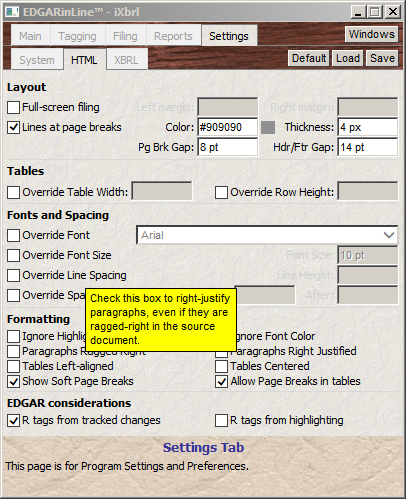
• Single-click conversion of your Word documents to professional-looking EDGAR-valid HTML. • EDGARized HTML requires no touchup, but EDGAR-valid HTML editor is included if ever needed. • Automatically extracts, links and handles embedded or linked graphics. • Settings let you easily customize the EDGARization. • Automatically supports features like hyperlinked Table of Contents and 'To Top' links on each page. • Preserves headers/footers, footnotes, page breaks, page and section numbering, etc. • Automatically deactivates disallowed hyperlinks, while preserving EDGAR-permitted ones. such as hyperlinks to exhibits. [see video] • Automatically inserts EDGAR-specific R tags based on revision-tracked and/or highlighted content. • Stores conversion profiles for clients with different preferences and requirements. • Consolidated filing proof combines all documents, exhibits and attachments into a single organized proof. • Extremely fast EDGARization - a real benefit during tight deadlines and last-minute changes.Easily prepare Inline XBRL (iXBRL) filings [see video]
• Supports all EDGAR Inline XBRL requirements, including multi-file iXBRL, and handles all SEC taxonomies,. • The fastest and easiest-to-use tagging interface in the industry - whether creating a filing from scratch or from an existing filing. • Built-in AI Agent automates Inline XBRL tagging by determining the right tags and applying them automatically. [see video] • Imports tagging from a prior filing, even if that filing was produced by some other product. • All tagging is in the Word document - no need to first convert to HTML, create special tables, or copy/paste numbers into templates. • Tagging carries over from quarter to quarter with no need to retag, thanks to features like self-adjusting time contexts. • Parenthetical numbers are tagged where they are - EDGARsuite ™ automatically creates parenthetical tables as needed. • “Smart-table tagging” drastically reduces time and effort by letting you tag just the row and column labels instead of each number. • No need to remove page breaks, page numbers, headers/footers, footnotes, etc. from text blocks. EDGARsuite™ handles them automatically. • Detects and reports data and label overwrites due to faulty tagging, and enbales you to fix the issues easily. • Automatic creation of calculation relationships and summation total roles. • Extended verification of calculations such as roll-forwards, and validation of 'Fundamental Accounting Concepts' (FACs). • Interactive validation lets you fix errors easily by taking you the the source of the error with a single click. • Collaborative tagging enables multiple users to simultaneously tag different parts of the filing . • Easily create XBRL and tagging reports with various levels of detail. • Stores Report formats and settings for clients with different preferences. • Automatically extracts, links and handles embedded or linked graphics. • Supports the latest inline XBRL features and standards, such as 'continuation', 'exclude' and ‘revision’ tags, extensible lists/enumerations., etc. • Automatically detects and asserts Inline XBRL transformations, saving you from having to do so manually. • Includes iXBRL renderer, letting you view the Inline XBRL rendering right on your computer prior to submission..Assemble and Submit your filing Automatically [see video]
• Automatically collects and assembles all documents, exhibits, graphics and other files - no time lost due to missing attachments. • Automatically excludes unreferenced files - no time lost to invalidation resulting from extra attachments. • Also includes creation, assembly and submission of many XML filings such as Regulation 1-A with exhibits..Emphasis on Ease of Use and No Repetition
• Enter client access codes, credentials, filing data and preferences only once - EDGARsuite™ automatically reenters them in subsequent filings. • Changes are made in only one place, and carry over automatically to HTML, XBRL and iXBRL. • Tag XBRL once - and keep resusing in subsequent quarters. • Tncludes tutorials, a well-organized manual, and instant right-click help on virtually every user interface item.Compatible with EDGAR Next
®
EDGAR Next ® is the SEC’s new enhanced security EDGAR platform that changes the way SEC filers, filing agents, and software tools access EDGAR to submit and check on filings. EDGARsuite ™ is compatible with all aspects of EDGAR NEXT ® , including submission using EDGAR Next ® API tokens.Licensing and Pricing
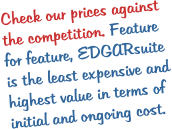
With no per-filing or per-CIK charges, EDGARsuite ™ is much more cost-effective than subscription- based pricing models. • One-time payment for a perpetual license, letting you use EDGARsuite ™ indefinitely for any number of filings and registrants. • Price includes free updates and tech suport for one year, after which you may continue using it as is, or renew updates and support for a nominal annual fee. • Software can be easily uninstalled from one machine and moved to another. • Network licenses and multi-user discounts are available to support multiple users cost-effectivelyConfigurations to suit your needs
The EDGARsuite ™ configurations and their single-machine license pricing are listed below: • HTML Basic ($1495) - includes document preparation/touch-up and conversion to HTML. . • Submission Module ($995) - supports automated assembly and single-click submssion to EDGAR, as well as certain XML filings. • HTML Pro ($2295) - includes the HTML Basic package and Submission Module. • Complete package with iXBRL ($4995) - Includes all the above as well as Inline XBRL. This is the most popular configuration. Please contact us for multi-user pricing and discounts.Payment Plan and Rebates
Special payment options and rebates are available for first-time purchase of the complete EDGARsuite ™ package: • 1-year Payment Plan - spread the cost over four quarterly payments. A nominal plan fee is added to the first payment. • Competitive Upgrade Rebate - if you are switching from some other product, we credit what you paid for it pro-rated up to $1000.Download for Free Trial
You may download EDGARsuite ™ for free unlmited trial prior to purchase. There are a few limitations in the trial mode, but it lets you evaluate the software’s ease of use and other features on your own documents and filings. The download includes the complete package. You can select the configuration you need at time of ordering.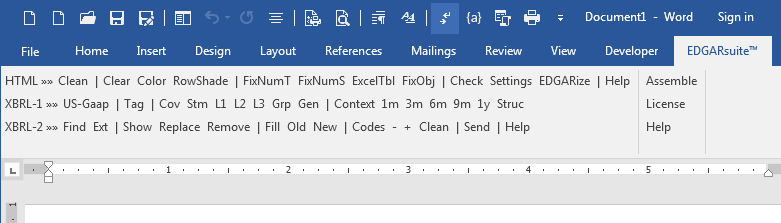












EDGARsuite
™
- The Premier Software Suite for SEC filers
sec-edgar-filing.com
a division of Advanced Computer Innovations, Inc.
70 Office Park Way • Pittsford, NY 14534-1746 (USA)
Phone or text: 585-510-3890 • Email: click here
Introducing EDGARsuite
™
- Unleash Your Filing Potential!
Tired of the tedious and time-consuming process of producing EDGAR filings? Look no further! With EDGARsuite ™ , our revolutionary desktop software, you can streamline your filing process while enjoying unmatched benefits that will revolutionize the way you work: • Cost Savings: Say goodbye to excessive fees and unnecessary expenses. EDGARsuite ™ empowers you to take control of your filing budget. No more outsourcing or hiring additional staff - our software provides cost savings that go straight to your bottom line. • Ease of Use: We understand that your time is precious. That's why we designed EDGARsuite ™ with simplicity in mind. Our intuitive interface allows you to effortlessly navigate through the filing process, even if you're a first- time user. Say farewell to complex systems and hello to seamless filings. • Accuracy: Accuracy is paramount when it comes to EDGAR filings. Trust in the precision of EDGARsuite ™ to ensure that your documents meet regulatory requirements flawlessly. With our software, you can eliminate the risk of errors, saving you from the headache of potential revisions. • Quick Speed: Time is of the essence, and we value your efficiency. EDGARsuite ™ empowers you to meet tight deadlines without compromising quality. Experience lightning-fast filing preparation and submission, saving you valuable hours that can be better utilized for strategic planning and growth. • Security and Confidentiality: We prioritize the safety of your sensitive data. With EDGARsuite ™ , you can rest easy knowing that your information remains secure on your local device. Take control of your filing process while maintaining the highest level of data confidentiality. • Inline XBRL: Stay ahead of the curve with our cutting-edge technology. EDGARsuite ™ supports Inline XBRL, enabling you to seamlessly and easily embed financial information directly into your filings using its user-friendly and responsive XBRL tagging interface. Its built-in AI Agent doesn’t just recommend the right Inline XBRL tags - it also applies them automatically! This means faster, more accurate filings with less manual effort, giving you intelligent automation and peace of mind in one powerful solution. • Collaboration: Teamwork makes the dream work, and EDGARsuite ™ understands the value of collaboration. Our software facilitates seamless collaboration among team members, allowing for simultaneous work on different sections of the filing. Enhance efficiency, foster teamwork, and maximize productivity. Don't let the complexities of EDGAR filings hold you back any longer. Unlock the full potential of your filing process with EDGARsuite ™ . Experience cost savings, ease of use, accuracy, quick speed, security, easy Inline XBRL with AI-based automatic tagging, and collaboration - all in one powerful software package. Get EDGARsuite ™ today and empower your filing strategy like never before! Contact us now to learn more and start your EDGARsuite™ journey. Your filing success awaits!Technical Details
EDGARsuite ™ is the most cost-effective, easy-to-use and comprehensive desktop software package for rapidly preparing HTML, XBRL, iXBRL, ASCII and several XML format SEC EDGAR filings - directly from Word documents and Excel spreadsheets with little or no touch-up needed.System Requirements
• Any machine running Windows 10 or higher - Windows desktop or laptop, a virtual machine, or a Mac running a Windows emulator. • Microsoft Office 2016 or higher, including Office 365.Work in familiar Microsoft Word/Excel environment
• EDGARsuite ™ integrates seamlessly with Microsoft Word, letting you work in already familiar environment. • Built-in functions for cleaning up and embellishing your documents - alternate row shading, aligning numbers, cleaning/formatting tables, etc. [see video] • Easily import and automatically format Excel sheets into your Word document. [see video]Feature-rich EDGARization to HTML [see video]
• Single-click conversion of your Word documents to professional-looking EDGAR-valid HTML. • EDGARized HTML requires no touchup, but EDGAR-valid HTML editor is included if ever needed. • Automatically extracts, links and handles embedded or linked graphics. • Settings let you easily customize the EDGARization. • Automatically supports features like hyperlinked Table of Contents and 'To Top' links on each page. • Preserves headers/footers, footnotes, page breaks, page and section numbering, etc. • Automatically deactivates disallowed hyperlinks, while preserving EDGAR- permitted ones. such as hyperlinks to exhibits. [see video] • Automatically inserts EDGAR-specific R tags based on revision-tracked and/or highlighted content. • Stores conversion profiles for clients with different preferences and requirements. • Consolidated filing proof combines all documents, exhibits and attachments into a single organized proof. • Extremely fast EDGARization - a real benefit during tight deadlines and last-minute changes.Easily prepare Inline XBRL (iXBRL) filings [see video]
• Supports all EDGAR Inline XBRL requirements, including multi-file iXBRL, and handles all SEC taxonomies,. • The fastest and easiest-to-use tagging interface in the industry - whether creating a filing from scratch or from an existing filing. • Built-in AI Agent automates Inline XBRL tagging by determining the right tags and applying them automatically. [see video] • Imports tagging from a prior filing, even if that filing was produced by some other product. • All tagging is in the Word document - no need to first convert to HTML, create special tables, or copy/paste numbers into templates. • Tagging carries over from quarter to quarter with no need to retag, thanks to features like self-adjusting time contexts. • Parenthetical numbers are tagged where they are - EDGARsuite ™ automatically creates parenthetical tables as needed. • “Smart-table tagging” drastically reduces time and effort by letting you tag just the row and column labels instead of each number. • No need to remove page breaks, page numbers, headers/footers, footnotes, etc. from text blocks. EDGARsuite™ handles them automatically. • Detects and reports data and label overwrites due to faulty tagging, and enbales you to fix the issues easily. • Automatic creation of calculation relationships and summation total roles. • Extended verification of calculations such as roll-forwards, and validation of 'Fundamental Accounting Concepts' (FACs). • Interactive validation lets you fix errors easily by taking you the the source of the error with a single click. • Collaborative tagging enables multiple users to simultaneously tag different parts of the filing . • Easily create XBRL and tagging reports with various levels of detail. • Stores Report formats and settings for clients with different preferences. • Automatically extracts, links and handles embedded or linked graphics. • Supports the latest inline XBRL features and standards, such as 'continuation', 'exclude' and ‘revision’ tags, extensible lists/enumerations., etc. • Automatically detects and asserts Inline XBRL transformations, saving you from having to do so manually. • Includes iXBRL renderer, letting you view the Inline XBRL rendering right on your computer prior to submission..Assemble and Submit your filing Automatically [see video]
• Automatically collects and assembles all documents, exhibits, graphics and other files - no time lost due to missing attachments. • Automatically excludes unreferenced files - no time lost to invalidation resulting from extra attachments. • Also includes creation, assembly and submission of many XML filings such as Regulation 1-A with exhibits..Emphasis on Ease of Use and No Repetition
• Enter client access codes, credentials, filing data and preferences only once - EDGARsuite™ automatically reenters them in subsequent filings. • Changes are made in only one place, and carry over automatically to HTML, XBRL and iXBRL. • Tag XBRL once - and keep resusing in subsequent quarters. • Tncludes tutorials, a well-organized manual, and instant right-click help on virtually every user interface item.Compatible with EDGAR Next
®
EDGAR Next ® is the SEC’s new enhanced security EDGAR platform that changes the way SEC filers, filing agents, and software tools access EDGAR to submit and check on filings. EDGARsuite ™ is compatible with all aspects of EDGAR NEXT ® , including submission using EDGAR Next ® API tokens.Licensing and Pricing
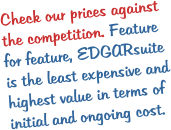
With no per-filing or per-CIK charges, EDGARsuite ™ is much more cost-effective than subscription-based pricing models. • One-time payment for a perpetual license, letting you use EDGARsuite ™ indefinitely for any number of filings and registrants. • Price includes free updates and tech suport for one year, after which you may continue using it as is, or renew updates and support for a nominal annual fee. • Software can be easily uninstalled from one machine and moved to another. • Network licenses and multi-user discounts are available to support multiple users cost-effectivelyConfigurations to suit your needs
The EDGARsuite ™ configurations and their single-machine license pricing are listed below: • HTML Basic ($1495) - includes document preparation/touch-up and conversion to HTML. . • Submission Module ($995) - supports automated assembly and single-click submssion to EDGAR, as well as certain XML filings. • HTML Pro ($2295) - includes the HTML Basic package and Submission Module. • Complete package with iXBRL ($4995) - Includes all the above as well as Inline XBRL. This is the most popular configuration. Please contact us for multi-user pricing and discounts.Payment Plan and Rebates
Special payment options and rebates are available for first-time purchase of the complete EDGARsuite ™ package: • 1-year Payment Plan - spread the cost over four quarterly payments. A nominal plan fee is added to the first payment. • Competitive Upgrade Rebate - if you are switching from some other product, we credit what you paid for it pro-rated up to $1000.Download for Free Trial
You may download EDGARsuite ™ for free unlmited trial prior to purchase. There are a few limitations in the trial mode, but it lets you evaluate the software’s ease of use and other features on your own documents and filings. The download includes the complete package. You can select the configuration you need at time of ordering.












EDGARsuite
™
sec-edgar-filing.com
a division of Advanced Computer Innovations, Inc.
70 Office Park Way • Pittsford, NY 14534-1746 (USA)
Phone or text: 585-510-3890 • Email: click here
Introducing EDGARsuite
™
- Unleash Your
Filing Potential!
Tired of the tedious and time-consuming process of producing EDGAR filings? Look no further! With EDGARsuite ™ , our revolutionary desktop software, you can streamline your filing process while enjoying unmatched benefits that will revolutionize the way you work: • Cost Savings: Say goodbye to excessive fees and unnecessary expenses. EDGARsuite ™ empowers you to take control of your filing budget. No more outsourcing or hiring additional staff - our software provides cost savings that go straight to your bottom line. • Ease of Use: We understand that your time is precious. That's why we designed EDGARsuite ™ with simplicity in mind. Our intuitive interface allows you to effortlessly navigate through the filing process, even if you're a first- time user. Say farewell to complex systems and hello to seamless filings. • Accuracy: Accuracy is paramount when it comes to EDGAR filings. Trust in the precision of EDGARsuite ™ to ensure that your documents meet regulatory requirements flawlessly. With our software, you can eliminate the risk of errors, saving you from the headache of potential revisions. • Quick Speed: Time is of the essence, and we value your efficiency. EDGARsuite ™ empowers you to meet tight deadlines without compromising quality. Experience lightning-fast filing preparation and submission, saving you valuable hours that can be better utilized for strategic planning and growth. • Security and Confidentiality: We prioritize the safety of your sensitive data. With EDGARsuite ™ , you can rest easy knowing that your information remains secure on your local device. Take control of your filing process while maintaining the highest level of data confidentiality. • Inline XBRL: Stay ahead of the curve with our cutting- edge technology. EDGARsuite ™ supports Inline XBRL, enabling you to seamlessly and easily embed financial information directly into your filings using its user- friendly and responsive XBRL tagging interface. Its built- in AI Agent doesn’t just recommend the right Inline XBRL tags - it also applies them automatically! This means faster, more accurate filings with less manual effort, giving you intelligent automation and peace of mind in one powerful solution. • Collaboration: Teamwork makes the dream work, and EDGARsuite ™ understands the value of collaboration. Our software facilitates seamless collaboration among team members, allowing for simultaneous work on different sections of the filing. Enhance efficiency, foster teamwork, and maximize productivity. Don't let the complexities of EDGAR filings hold you back any longer. Unlock the full potential of your filing process with EDGARsuite ™ . Experience cost savings, ease of use, accuracy, quick speed, security, easy Inline XBRL with AI-based automatic tagging, and collaboration - all in one powerful software package. Get EDGARsuite ™ today and empower your filing strategy like never before! Contact us now to learn more and start your EDGARsuite™ journey. Your filing success awaits!Technical Details
EDGARsuite ™ is the most cost-effective, easy-to-use and comprehensive desktop software package for rapidly preparing HTML, XBRL, iXBRL, ASCII and several XML format SEC EDGAR filings - directly from Word documents and Excel spreadsheets with little or no touch-up needed.System Requirements
• Any machine running Windows 10 or higher - Windows desktop or laptop, a virtual machine, or a Mac running a Windows emulator. • Microsoft Office 2016 or higher, including Office 365.Work in familiar Microsoft Word/Excel
environment
• EDGARsuite ™ integrates seamlessly with Microsoft Word, letting you work in already familiar environment. • Built-in functions for cleaning up and embellishing your documents - alternate row shading, aligning numbers, cleaning/formatting tables, etc. [see video] • Easily import and automatically format Excel sheets into your Word document. [see video]Feature-rich EDGARization to HTML [see video]
• Single-click conversion of your Word documents to professional-looking EDGAR-valid HTML. • EDGARized HTML requires no touchup, but EDGAR-valid HTML editor is included if ever needed. • Automatically extracts, links and handles embedded or linked graphics. • Settings let you easily customize the EDGARization. • Automatically supports features like hyperlinked Table of Contents and 'To Top' links on each page. • Preserves headers/footers, footnotes, page breaks, page and section numbering, etc. • Automatically deactivates disallowed hyperlinks, while preserving EDGAR-permitted ones. such as hyperlinks to exhibits. [see video] • Automatically inserts EDGAR-specific R tags based on revision-tracked and/or highlighted content. • Stores conversion profiles for clients with different preferences and requirements. • Consolidated filing proof combines all documents, exhibits and attachments into a single organized proof. • Extremely fast EDGARization - a real benefit during tight deadlines and last-minute changes.Easily prepare Inline XBRL (iXBRL) filings [see
video]
• Supports all EDGAR Inline XBRL requirements, including multi-file iXBRL, and handles all SEC taxonomies,. • The fastest and easiest-to-use tagging interface in the industry - whether creating a filing from scratch or from an existing filing. • Built-in AI Agent automates Inline XBRL tagging by determining the right tags and applying them automatically. [see video] • Imports tagging from a prior filing, even if that filing was produced by some other product. • All tagging is in the Word document - no need to first convert to HTML, create special tables, or copy/paste numbers into templates. • Tagging carries over from quarter to quarter with no need to retag, thanks to features like self-adjusting time contexts. • Parenthetical numbers are tagged where they are - EDGARsuite ™ automatically creates parenthetical tables as needed. • “Smart-table tagging” drastically reduces time and effort by letting you tag just the row and column labels instead of each number. • No need to remove page breaks, page numbers, headers/footers, footnotes, etc. from text blocks. EDGARsuite™ handles them automatically. • Detects and reports data and label overwrites due to faulty tagging, and enbales you to fix the issues easily. • Automatic creation of calculation relationships and summation total roles. • Extended verification of calculations such as roll-forwards, and validation of 'Fundamental Accounting Concepts' (FACs). • Interactive validation lets you fix errors easily by taking you the the source of the error with a single click. • Collaborative tagging enables multiple users to simultaneously tag different parts of the filing . • Easily create XBRL and tagging reports with various levels of detail. • Stores Report formats and settings for clients with different preferences. • Automatically extracts, links and handles embedded or linked graphics. • Supports the latest inline XBRL features and standards, such as 'continuation', 'exclude' and ‘revision’ tags, extensible lists/enumerations., etc. • Automatically detects and asserts Inline XBRL transformations, saving you from having to do so manually. • Includes iXBRL renderer, letting you view the Inline XBRL rendering right on your computer prior to submission..Assemble and Submit your filing Automatically
[see video]
• Automatically collects and assembles all documents, exhibits, graphics and other files - no time lost due to missing attachments. • Automatically excludes unreferenced files - no time lost to invalidation resulting from extra attachments. • Also includes creation, assembly and submission of many XML filings such as Regulation 1-A with exhibits..Emphasis on Ease of Use and No Repetition
• Enter client access codes, credentials, filing data and preferences only once - EDGARsuite™ automatically reenters them in subsequent filings. • Changes are made in only one place, and carry over automatically to HTML, XBRL and iXBRL. • Tag XBRL once - and keep resusing in subsequent quarters. • Tncludes tutorials, a well-organized manual, and instant right-click help on virtually every user interface item.Compatible with EDGAR Next
®
EDGAR Next ® is the SEC’s new enhanced security EDGAR platform that changes the way SEC filers, filing agents, and software tools access EDGAR to submit and check on filings. EDGARsuite ™ is compatible with all aspects of EDGAR NEXT ® , including submission using EDGAR Next ® API tokens.Licensing and Pricing
With no per-filing or per- CIK charges, EDGARsuite ™ is much more cost-effective than subscription-based pricing models. • One-time payment for a perpetual license, letting you use EDGARsuite ™ indefinitely for any number of filings and registrants. • Price includes free updates and tech suport for one year, after which you may continue using it as is, or renew updates and support for a nominal annual fee. • Software can be easily uninstalled from one machine and moved to another. • Network licenses and multi-user discounts are available to support multiple users cost-effectivelyConfigurations to suit your needs
The EDGARsuite ™ configurations and their single-machine license pricing are listed below: • HTML Basic ($1495) - includes document preparation/touch-up and conversion to HTML. . • Submission Module ($995) - supports automated assembly and single-click submssion to EDGAR, as well as certain XML filings. • HTML Pro ($2295) - includes the HTML Basic package and Submission Module. • Complete package with iXBRL ($4995) - Includes all the above as well as Inline XBRL. This is the most popular configuration. Please contact us for multi-user pricing and discounts.Payment Plan and Rebates
Special payment options and rebates are available for first- time purchase of the complete EDGARsuite ™ package: • 1-year Payment Plan - spread the cost over four quarterly payments. A nominal plan fee is added to the first payment. • Competitive Upgrade Rebate - if you are switching from some other product, we credit what you paid for it pro- rated up to $1000.Download for Free Trial
You may download EDGARsuite ™ for free unlmited trial prior to purchase. There are a few limitations in the trial mode, but it lets you evaluate the software’s ease of use and other features on your own documents and filings. The download includes the complete package. You can select the configuration you need at time of ordering.